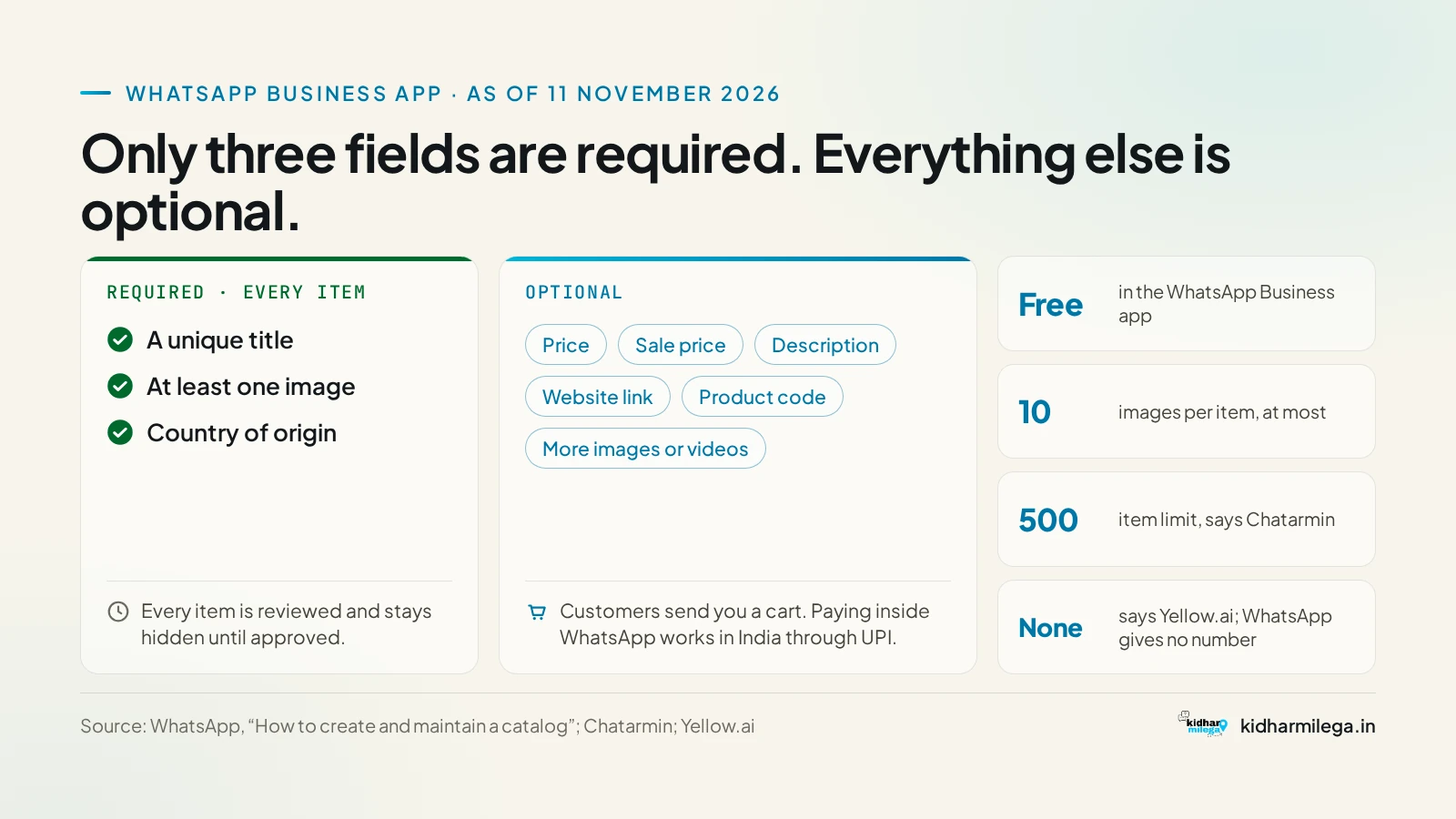
A WhatsApp Business catalog is a free product showroom inside the WhatsApp Business app. It holds up to 500 items, and each item can have up to 10 photos or videos, a name and a ₹ price if you want one. To make one, go to Settings (or ⋮) > Business tools > Catalog > Add new item. WhatsApp explains the feature on its official WhatsApp Business catalog page.
Buyers you meet at a mela or on IndiaMART usually ask the same thing first: "Photo bhejo, rate batao." One catalog link answers that, so you don't have to send 40 photos one by one.
Key facts (as of 14 November 2026)
- Cost: free in the WhatsApp Business app.
- Limits: 500 items, with up to 10 photos or videos per item.
- Required fields: the item name and the country of origin. Price, sale price, description, link and product code are optional.
- Not a new feature: catalogs came to India in November 2019, and catalog links and QR codes arrived in July 2020.
- Approval: customers only see an item after WhatsApp approves it under the Business Messaging Policy, which was last updated on 23 September 2026.
- Payments: since 2023, customers in India can pay inside WhatsApp by UPI or card.
- New in 2026: Meta's Business Agent, launched on 3 June 2026, recommends products from your catalog. It's free to start, and Meta says paid plans are coming. A clean catalog now does two jobs: it shows buyers your range and it feeds the AI agent.
How to set up a WhatsApp Business catalog on your phone
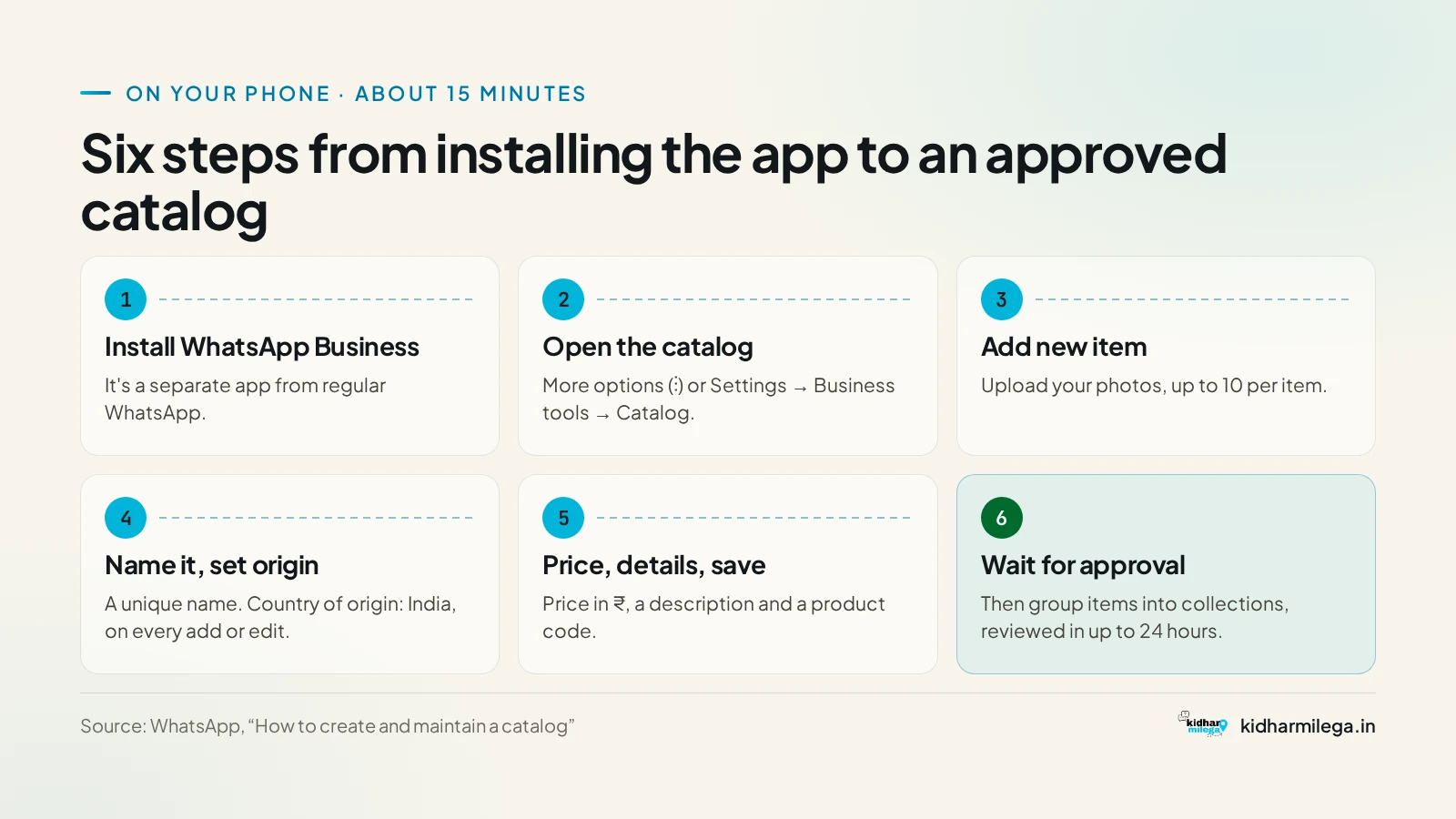
- Install the WhatsApp Business app. It's a separate app from regular WhatsApp.
- Open Settings (on some phones it's ⋮ or Tools), then Business tools > Catalog. The menu names change a little between app versions.
- Tap Add new item and upload your photos.
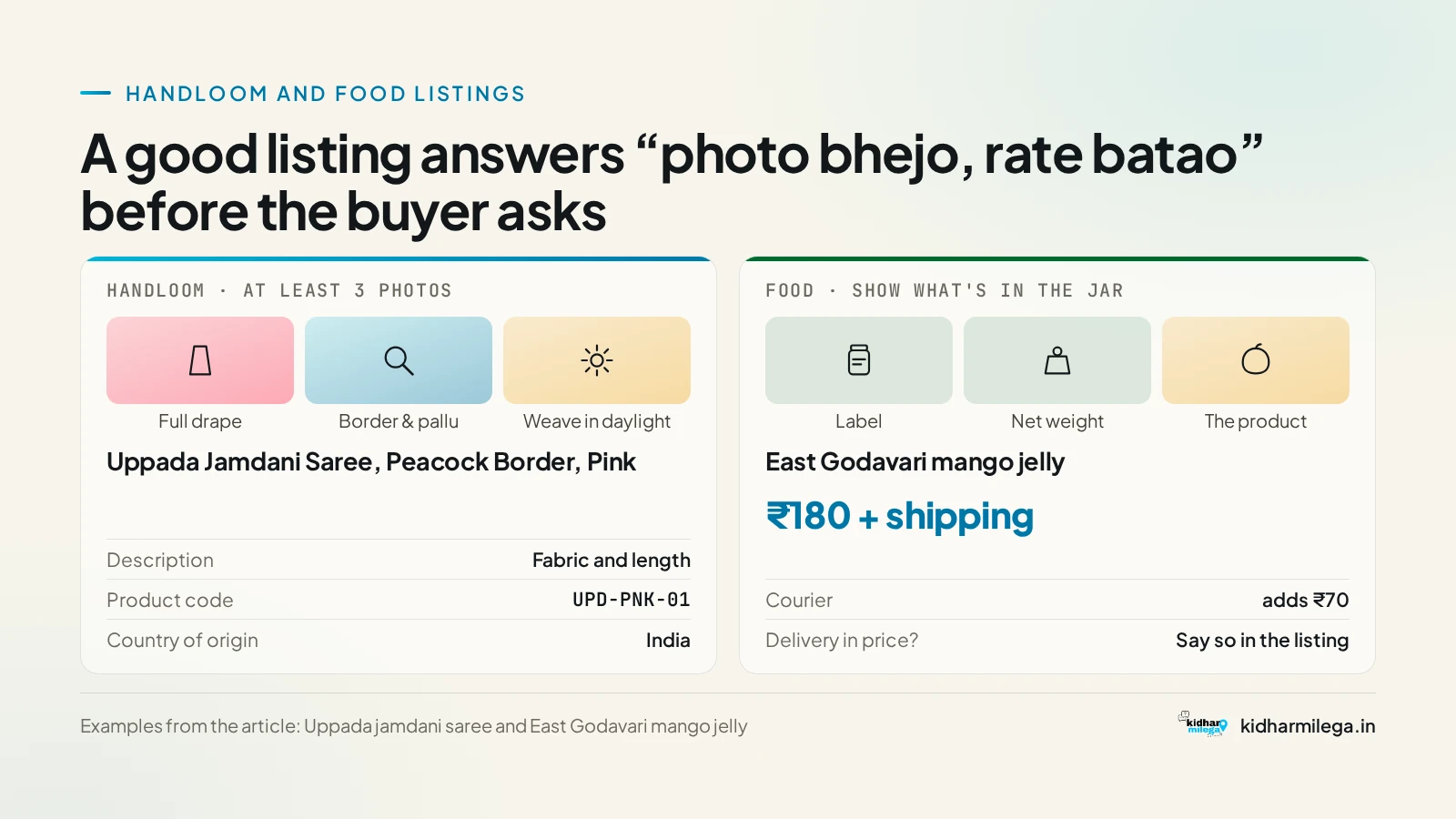
- Give the item a specific name, like "Uppada Jamdani Saree, Peacock Border, Pink". Avoid vague names like "Saree 1".
- Set the country of origin to India and save.
- Add the price, a description and a product code, then save again.
- To group items, tap Add new collection and make groups like "Cotton sarees" or "Pickles". WhatsApp reviews collections within 24 hours.
Photos and prices for handloom and food sellers
Handloom: post at least three photos of each piece: the full drape, a close-up of the border and pallu, and the weave in daylight. If you sell Uppada jamdani or Bhagalpur silk, put the fabric and length in the description. The buyer can't touch the cloth, so your close-up photo has to show it for them.
Food: show the label, the net weight and the product itself. Here's a worked example. A jar of East Godavari mango jelly costs you ₹180 to sell, and courier adds ₹70. Write either "₹180 + ₹70 shipping" or "₹250 delivered", and nothing in between. If you don't, every chat turns into an argument about the extra ₹70. Add your FSSAI licence number to the description, and leave out health claims. Medical and healthcare products are on WhatsApp's banned list.
Use the product code field for your own SKU, such as "UPD-PNK-01". When a buyer orders 20 pieces, you'll know exactly which ones they mean.
Why your catalog item isn't showing
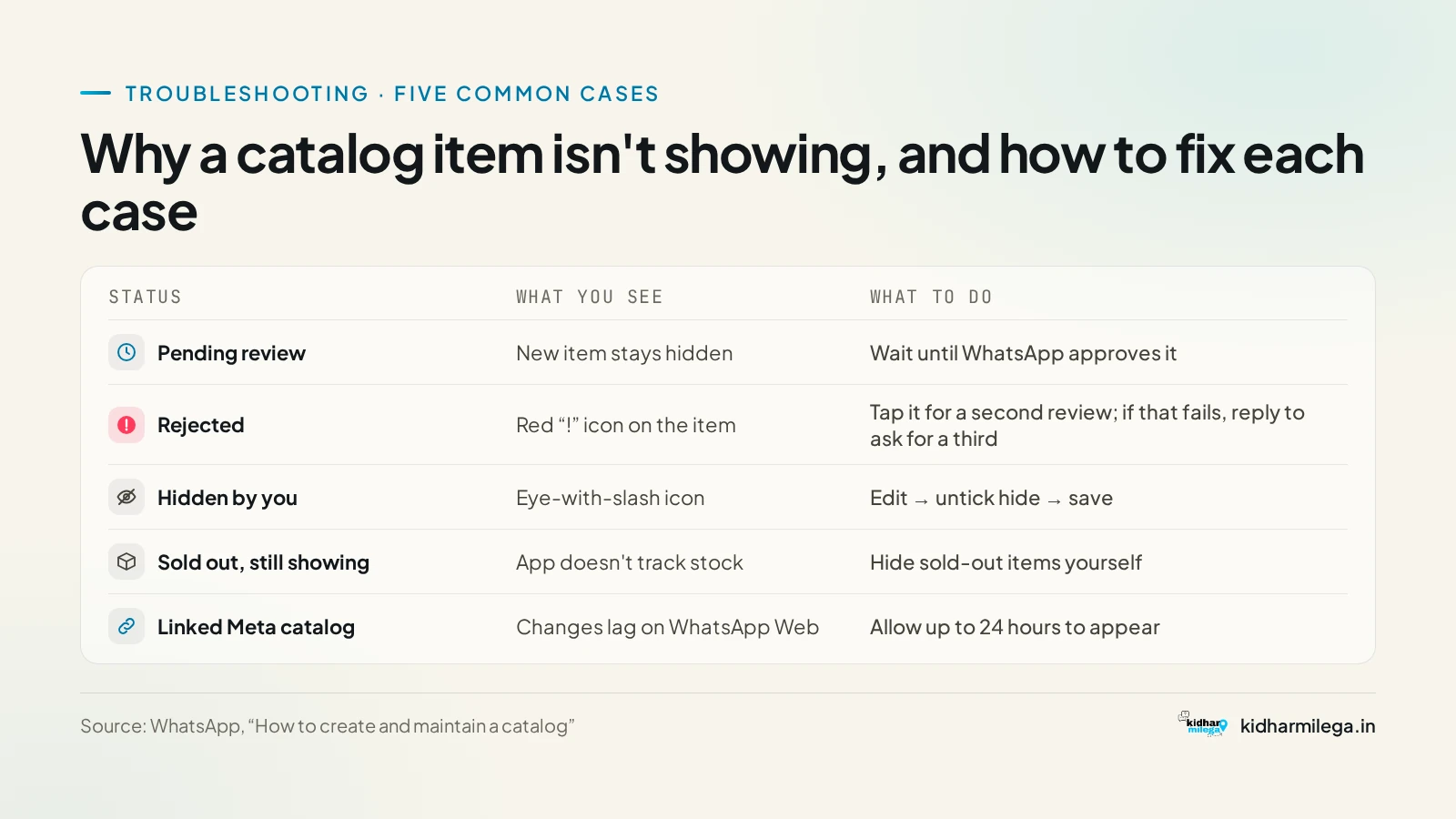
- Pending: new items stay hidden until WhatsApp approves them.
- Rejected: a red "!" icon appears on the item. Open it and tap Request another review.
- Banned category: this list includes alcohol, tobacco, weapons, healthcare products, live animals (livestock is allowed) and more. Having a valid licence doesn't make a banned item allowed.
- Editing on a laptop: WhatsApp Web can only show your catalog, not edit it. If you connected a Meta catalog, changes can take up to 24 hours to appear on Web.
Sharing the catalog at expos and on IndiaMART
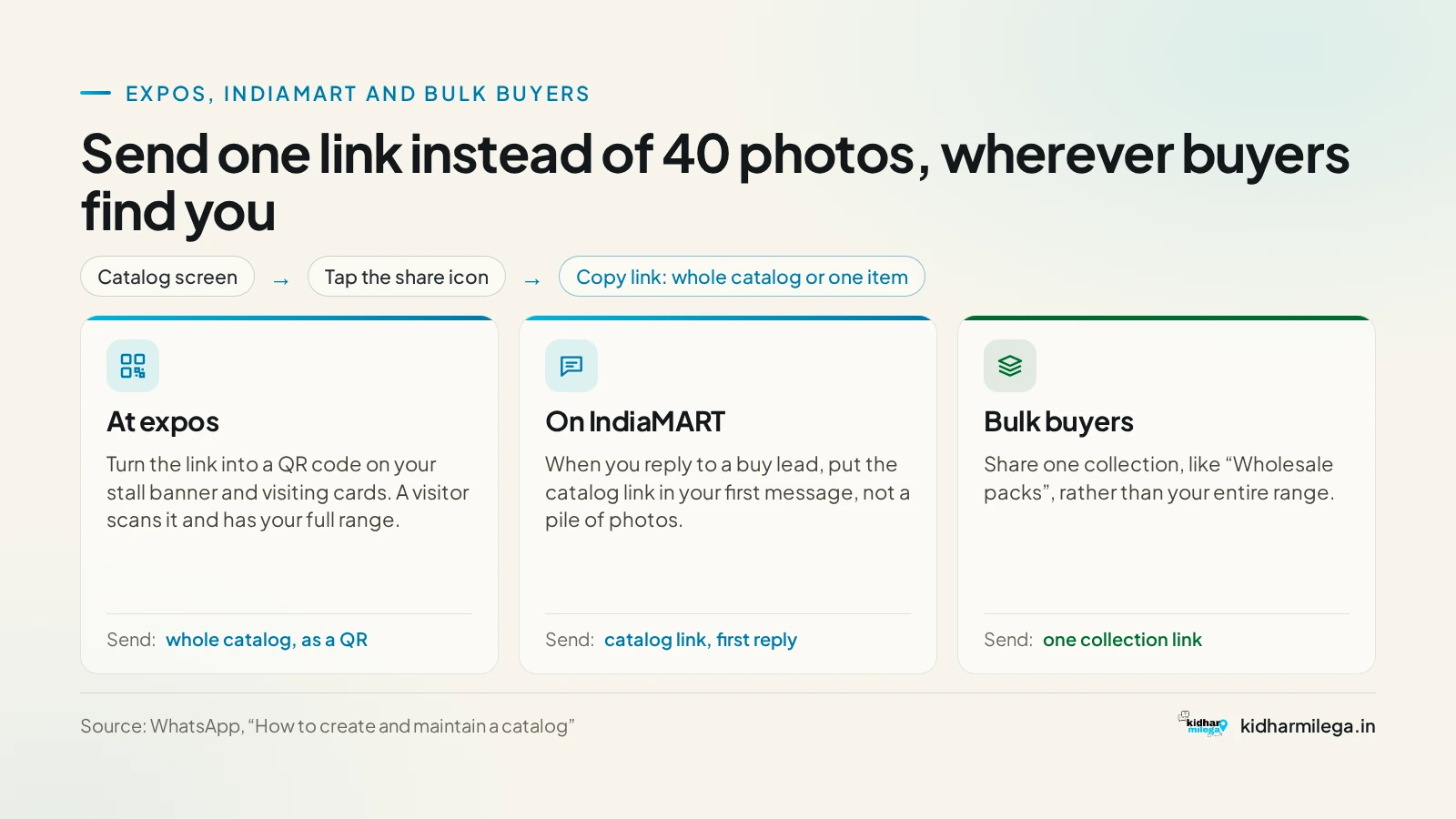
You can share your whole catalog or a single item in a chat, on Status, in auto-replies or as a link. Turn the link into a QR code and print it on your stall banner and visiting cards. When you reply to an IndiaMART lead, send the catalog link in your first message instead of a pile of photos. Before your next stall, check the upcoming expos and trade fairs near you. Expo mein sale kam, contacts zyada milte hain.
The catch: your catalog only works inside WhatsApp
A WhatsApp catalog only works for people who already have your number or your link. It doesn't put you in front of a buyer who is searching for your district's product. That's why many sellers keep a second catalog that opens in any browser.
| WhatsApp Business catalog | KidharMilega Online | |
|---|---|---|
| Cost | Free | Free |
| Where the buyer opens it | Inside WhatsApp | A link that opens in a browser |
| How the buyer orders | Sends a cart or a message in chat | Fills in an enquiry form |
| Who finds you | People who already have your link | Also people visiting your district and ODOP page, if you ask to be listed |
| At an expo | QR code of your catalog link | Link or tap-to-share NFC card |
You don't have to choose one. Use the WhatsApp catalog for buyers who are already chatting with you. Put a free KidharMilega Online store page in your IndiaMART profile, your Instagram bio and your expo banner. That page has the same product catalog and an enquiry form, and you can get it listed on your district's ODOP page on kidharmilega.in.
Toh banana chahiye ya nahi?
If you sell more than five products and buyers already message you, yes, set it up this week. It's free and takes one evening. If you sell only one product, one good photo and a fixed rate message will do the same job.
Your next step: photograph your 10 best sellers this weekend and upload them. For more district product guides, start from the KidharMilega homepage.
Frequently asked questions
Is the WhatsApp Business catalog free?
Yes. The catalog is free inside the WhatsApp Business app. You don't pay to add items, make collections or share links. Paid charges only apply to businesses on the WhatsApp Business Platform (API), which is a separate product for larger setups. A small handloom or food seller can run the whole catalog on the free app.
How many products can I add to a WhatsApp catalog?
WhatsApp's official catalog page says you can add up to 500 items, with up to 10 photos or videos for each item. If you sell more than that, keep your best sellers and current stock in the catalog and hide or delete sold-out pieces, so buyers only see what you can actually ship.
Why was my WhatsApp catalog item rejected?
Items are checked against WhatsApp's Business Messaging Policy. Common reasons are banned categories such as alcohol, tobacco, weapons and medical or healthcare products, or images that break the rules. A rejected item shows a red exclamation icon. Open it and tap Request another review. A valid licence does not make a banned item allowed.
Can I edit my WhatsApp catalog on WhatsApp Web?
No. WhatsApp Web can only show the catalog. You add, edit, hide and connect items in the mobile app. If you linked a Meta catalog through a Facebook Page, changes can take up to 24 hours to appear on WhatsApp Web.
Can customers pay inside WhatsApp in India?
Yes. Since 2023, customers in India can pay businesses inside WhatsApp using UPI or cards. Buyers can also add items from your catalog to a cart and send it to you in chat. You then confirm stock, the shipping charge and the delivery date before you pack the order.
Is there an alternative to the WhatsApp catalog that works outside WhatsApp?
Yes. A web catalog opens in any browser, so a buyer doesn't need your WhatsApp number to see your products. KidharMilega Online gives you a free business profile with a product catalog and an enquiry form that you can share as a link. Many sellers use both: WhatsApp for chats, the web page for IndiaMART, Instagram and expos.
Sources
- WhatsApp Business catalog · WhatsApp
- WhatsApp Business Messaging Policy · WhatsApp
- Connected catalogs on WhatsApp · WhatsApp Help Center
- Introducing catalogs for small businesses · WhatsApp Blog
- Introducing Meta Business Agent · WhatsApp Business
- WhatsApp Business adds QR codes and catalog sharing · WeRSM
- WhatsApp Business catalogues and payments in India · Webfluence
- WhatsApp catalogue setup for retailers · Kosmonk